
Canadian Bridge Federation • RealBridge Pairs
Maple Leaf Online Games
Games every Friday on RealBridge – welcoming all bridge players and building community across Canada.
- Earn ACBL masterpoints
- Multiple flights so you play your peers
- Friendly, camera-on environment
Brought to you by the Canadian Bridge Federation (CBF). Play online. Connect globally. Support Canadian bridge.
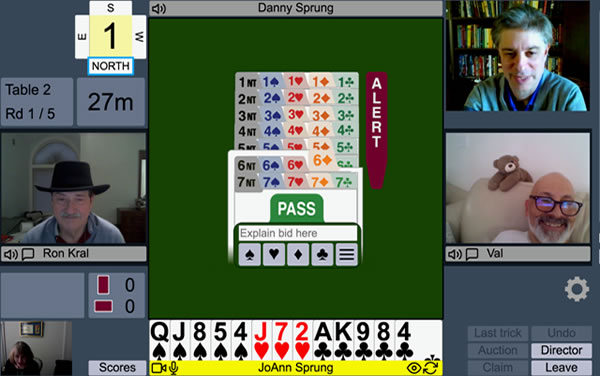
What are the Maple Leaf Online Games?
The Maple Leaf Online Games are CBF-organized RealBridge pairs events that bring players together from coast to coast. Games are structured in flights so everyone, from developing players to seasoned experts, can compete in a comfortable and fun setting.
Each session is played on RealBridge, which combines online play with live audio and video so you can see and talk to your partner and opponents. And every game awards ACBL Masterpoints.
A portion of profits can be shared with your Home Club, so invite your friends to play. If you haven’t completed it yet, please fill out the Home Club survey.
Upcoming Maple Leaf Games
Here is a snapshot of the next few sessions. For the full schedule and all registration links, use the button below.
How It Works
Before you join a Maple Leaf Online Game, there are a few simple steps to follow.
Create a RealBridge Account & Deposit Funds
Create your account
Go to the RealBridge Account Setup Guide and follow the instructions. When you reach users.realbridge.online, make sure to select “Continue with ACBL”.
Deposit funds
Choose a Canadian or US dollar account in your RealBridge portal and deposit funds using the payment options provided.
Need help?
If you have any issues creating your account or depositing funds, contact RealBridge at (647) 483-4993 (Toronto) or support@realbridge.online.
We strongly recommend setting up your RealBridge account and depositing funds well before game day so any technical or banking issues can be resolved in time.
Once your RealBridge account is ready, joining a Maple Leaf Online Game is a simple three-step process.
-
1. Register for a Game
Use the schedule above to choose your date and flight. Submit your registration and fee using the link provided.
-
2. Receive Your RealBridge Link
Before the game, you’ll receive an email with your personalized RealBridge link. Keep this email handy and test your camera/microphone in advance.
-
3. Log In and Play
On game day, click your RealBridge link 10–15 minutes before start time. Sit with your partner, enjoy the session, and stay afterwards if an expert review is scheduled.
Detailed RealBridge instructions (including browser requirements and troubleshooting tips) are available on our RealBridge information page.